

Configuration
Overview · Installation · Usage · Developer notes · FAQ
Add-ons → Manage add-ons → Frequently Bought Together & Cross-sell → Settings. In CS-Cart Ultimate the General settings can differ per storefront; the Recommendation data settings apply to the whole installation.
General
Section titled “General”| Setting | Default | Description |
|---|---|---|
| Enable recommendations | On | Switches the storefront blocks, the tracking and the rebuilds on or off. |
| Show the block on product pages | On | The Frequently bought together block above the product tabs. |
| Recommended products next to the product | 2 | 1–3. The viewed product is shown first, so 2 means a set of 3 products. |
| Pre-select all products | On | When off, only the viewed product is ticked and the shopper ticks the others. |
| Show recommendations on the cart page | On | “Frequently bought with items in your cart” below the cart. |
| Products in the cart block | 4 | 2, 3, 4 or 6. |
| When there is not enough order data | Popular products of the category | Fills the block with the most popular products of the product’s main category, or shows no block. |
| Show the bundle savings | On | Shows “Save X% when you buy these products together” and the crossed-out total when an active cart promotion uses the Frequently bought together discount bonus by percentage and has no conditions. |
| Recommend only products of the same vendor | On | Multi-Vendor only. Pairs are learned across the marketplace, but a vendor’s product page recommends only that vendor’s products. |
Recommendation data
Section titled “Recommendation data”| Setting | Default | Description |
|---|---|---|
| Orders with these statuses count | Processed, Complete | Only these orders feed the recommendations. The same statuses decide which orders count as attributed revenue in the analytics. |
| Order history to analyse, days | 365 | Older orders are ignored. |
| Recency half-life, days | 90 | Recent orders weigh more: an order this many days old counts half, twice as old a quarter. 0 = every order counts the same. |
| Minimum orders per pair | 2 | A pair is used only when at least this many orders contain both products. |
| Minimum confidence, % | 5 | Share of the orders with product A that also contain product B. |
| Skip orders with more products than | 30 | Wholesale-size orders say little about what belongs together and slow the rebuild down. |
| Never recommend products of these category IDs | empty | Comma-separated category IDs, for example gift cards or samples. |
| Rebuild every, hours | 24 | When the data counts as outdated (admin fallback and the “due” check). |
| Rebuild after admin page views | On | Runs a due rebuild after an admin page has been sent, when no cron job did it. |
| Scheduled rebuild | The last rebuild, orders analysed, pairs, products with pairs, the cron command and the cron URL (with its secret key). |
After changing a data setting, click Rebuild now on Marketing → Frequently bought together to apply it at once.
License
Section titled “License”The license status is shown in a License card at the top of the add-on page, above the tabs, so you see it on every tab. The License tab holds the key itself. The key is stored once for the whole installation.
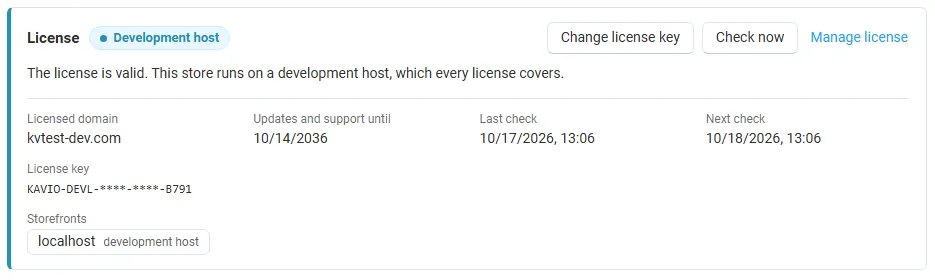
The License card shows:
- the status in color: green when valid, blue for a development host or the 14-day period before a key is required (with the days left), amber when the license server could not be reached (with the days left) or a Marketplace number is still being verified, red when the add-on is switched off;
- in plain words what the status means and, when the add-on is (or will be) switched off, what stops: the Frequently bought together blocks are hidden and recommendations are no longer rebuilt; carts that already contain a bought-together set keep their discount; your data and statistics are kept;
- the licensed domain, every storefront with its result (covered, development host, not covered), the end of the updates and support period, the last and the next check, and the key in use (masked);
- the actions Enter license key / Change license key (opens the License tab), Check now (verifies at once and stays on the page), Manage license (your licenses on cs-cart.kaviolabs.com) and, without a valid license, Buy a license.
In Add-ons → Manage add-ons the add-on’s row shows a small license badge next to its name, for example License: Valid or License: Pending · 9 days left. The analytics page shows the license status in a bar at the top.
| Setting | Description |
|---|---|
| License key | Your Kavio Labs license key (KAVIO-XXXX-XXXX-XXXX-XXXX, from My licenses on cs-cart.kaviolabs.com) or your CS-Cart Marketplace license number. If you entered the Marketplace license number in Add-ons → Manage add-ons (the add-on’s license field), leave this empty: the add-on uses that number. |
| License status | Points to the License card and explains what the check sends. |
What the license covers. A license is bound to the base domain you entered at purchase (for example example.com) and covers every subdomain of it (www.example.com, shop.example.com, staging.example.com). Local development hosts are always allowed: localhost, 127.0.0.1 and other private IP addresses, and host names ending in .localhost, .test, .local, .example or .invalid. A store on a different base domain needs its own license. If you move your store to a new domain, contact support.
When the add-on checks. When you save the key, and then once a day. The check runs only in the admin panel (on a page you open) or from cron, never while customers browse the storefront or check out, and takes a few seconds at most. A cron job keeps the license verified even when nobody opens the admin panel:
php /path/to/store/admin.php --dispatch=kv_frequently_bought_together_license.checkWhat is sent. The check sends this to https://cs-cart.kaviolabs.com and nothing else: the license key, the add-on ID and version, the host names of your storefronts, your CS-Cart version and edition, and a random one-time value. No customer, order or personal data is sent. The server answers with a digitally signed result, so a forged answer is ignored.
Statuses.
| Status (card) | Color | What happens |
|---|---|---|
| Valid | Green | The license is valid for this domain. Everything works. |
| Development host | Blue | The store runs on a local development host, which every license covers. Everything works. |
| Pending verification | Amber | A CS-Cart Marketplace license number was accepted, but the Marketplace has not confirmed it yet. Everything works. |
| Pending · N days left | Blue | No verified key yet (a new installation). Everything works for 14 days. |
| Grace period · N days left | Amber | The last checks failed (for example a network problem). The add-on keeps working for 14 days after the first failed check. |
| Not activated, Invalid key, Revoked, Domain mismatch, Not verified | Red | The Frequently bought together blocks are hidden and recommendations are no longer rebuilt. Carts that already contain a bought-together set keep their discount; your data and statistics are kept. Domain mismatch shows the licensed domain next to the domain your store runs on. |
When your updates and support period ends, the add-on keeps working. Only updates and support stop.
License information appears in the admin panel only, and only for administrators who may manage add-ons; vendors and customers never see it.