

Configuration
Overview · Installation · Usage · Developer notes · FAQ
Configuration has three levels:
- Add-on settings: global options and custom label thresholds.
- Feeds: each feed has its own target, product selection, attribute mapping, price and shipping settings.
- Category mapping, rules and product overrides: shared by all feeds.
Add-on settings
Section titled “Add-on settings”Add-ons > Manage add-ons > Product Feed Pro > Settings
General
Section titled “General”| Setting | Default | Description |
|---|---|---|
| Products per batch | 200 | How many products are loaded at once during generation. Lower it on hosts with little memory. Memory use does not grow with the catalog size. |
| Leave out items with errors | On | Items Google would reject (no image, no price, zero price, duplicate ID) are listed in the report but left out of the feed. |
| Allow vendors to manage their own feeds | Off | Multi-Vendor only. Vendors get Marketing > Google Merchant feeds in the vendor panel and can create feeds with their own products. |
| Scheduled generation (cron) | Shows the cron command and the secret cron URL. |
Custom labels
Section titled “Custom labels”| Setting | Default | Used by |
|---|---|---|
| Price bands | 0-25,25-50,50-100,100-250,250+ |
“Price band” label (feed currency, after discounts) |
| Cost price feature | None | “Margin” label and the Margin % rule condition. Pick a number feature that holds the cost price in the primary currency. |
| Margin bands (%) | 0-20,20-40,40+ |
“Margin” label, e.g. margin 20-40% |
| Bestseller period (days) | 90 | “Bestseller” label and the Units sold condition (paid orders only) |
| Bestseller minimum units sold | 5 | Products with at least this many units sold get bestseller |
| New arrival period (days) | 30 | Products created within this period get new |
| Low stock threshold | 5 | “Stock level” label: in_stock, low_stock or out_of_stock |
Feed settings
Section titled “Feed settings”Marketing > Google Merchant feeds > (feed)
General tab
Section titled “General tab”| Field | Description |
|---|---|
| Name | Internal name. Also used as the channel description in XML. |
| Storefront (Ultimate) / Vendor (Multi-Vendor) | Ultimate: the storefront whose catalog, URLs and promotions are used. Multi-Vendor: All vendors for a marketplace feed, or one vendor for a vendor feed. |
| Format | XML (RSS 2.0, g: namespace) or TSV. Promotions feeds are always TSV. |
| Target country | Used for shipping entries. Create one feed per country. |
| Language | Language of titles, descriptions, categories, features and links. |
| Currency | Prices are converted from the primary currency with the store’s exchange rate. The currency must be the currency of the target country. |
| Generation | On request, cached: built when the URL is fetched and reused until the cache lifetime ends. Scheduled (cron): built only by cron or Generate now. |
| Cache lifetime | Minutes an on-request feed file is reused (default 60). |
| Status | Disabled feeds return “404 Feed disabled”. |
Products tab
Section titled “Products tab”| Field | Description |
|---|---|
| Only these categories / Exclude categories | Subcategories are included automatically. |
| Include out-of-stock products | Recommended. Out-of-stock products are sent as out_of_stock. |
| Include every variation | Each variation is its own item with a shared item_group_id. When off, only the main products of the variation groups are sent. |
| Price range | Minimum and maximum price, in the feed currency after discounts. |
| Exclude product IDs | Comma-separated CS-Cart product IDs. |
| Only these vendors | Multi-Vendor marketplace feeds only. |
| Item ID | Product code (SKU), falling back to the product ID when empty, or the product ID. Keep IDs stable after the first upload. |
| ID prefix | Optional prefix, e.g. US-, if you send the same products from several stores to one Merchant Center account. |
Attributes tab
Section titled “Attributes tab”Each attribute row has a Source, an optional Fixed value and a Default when empty.
| Source | Meaning |
|---|---|
| Do not send | The attribute is left out. |
| Automatic | Built-in detection (see below). |
| Fixed value | The text in Fixed value for every product. |
| Product fields | Name, code, short/full/meta description, page title, search words, vendor name, main category name or path, weight, quantity, list price. |
| Computed labels | Price band, margin, bestseller, new arrival, on sale, stock level, top category, vendor. |
| Features | Any product feature. Multiple-choice values are joined with /. |
| Options | All variants of the product option with that name, joined with / (e.g. Red/Blue). |
Automatic sources:
| Attribute | Automatic value |
|---|---|
| title | Product name. Variation feature values are appended when Add variation features to titles is on. |
| description | Full description, else short description, else meta description, as plain text. |
| brand | Value of the Brand-type feature. |
| gtin | Feature named GTIN, EAN, EAN-13, UPC, ISBN, JAN or Barcode. |
| identifier_exists | no when GTIN is empty and brand or MPN is empty, otherwise left out. |
| google_product_category | Category mapping of the main category (or the closest mapped parent), else the feed default. |
| product_type | Main category path, e.g. Apparel > Men's Clothing. |
| color, size, gender, age_group, material, pattern | Feature, then option, with that name (English or the feed language, e.g. Color/Colour/Renk). |
| adult | yes when age verification is on for the product. |
Values of enumerated attributes are normalized: for example Men, Erkek and boys become male, and Y becomes yes. Values Google does not accept are left out and reported.
Precedence: attribute mapping (with default) → product-level override → rules. Rules never change an attribute that has a product-level override.
Price and shipping tab
Section titled “Price and shipping tab”| Field | Description |
|---|---|
| Price adjustment | Optional percentage added to all prices, e.g. 20 to add VAT when catalog prices exclude tax and the target country needs tax-inclusive prices. Leave empty for the US and Canada. |
| Send catalog discounts as sale_price | Catalog promotions produce price (regular) and sale_price (discounted). When the promotion has an end date, sale_price_effective_date is added. |
| Link cart promotions | Adds promotion_id to products covered by product- or category-specific cart promotions. |
| Link parameters | Appended to every product URL, e.g. utm_source=google&utm_medium=shopping. {product_id} and {id} are replaced. |
| Shipping costs in the feed | Use Merchant Center shipping settings (recommended), Flat rate, or Flat rate, free above an amount. Products with Free shipping get 0. |
| Service name, handling and transit times | Sent as g:shipping sub-attributes. |
| Send shipping_weight | Product weight converted to lb, oz, g or kg. |
| Excluded / included destinations | excluded_destination / included_destination for every item. Use rules for some products only. |
Category mapping
Section titled “Category mapping”Marketing > Google Merchant feeds > Category mapping
Search a store category, type a few words of the Google category (e.g. “running shoes”) and pick a result. Subcategories inherit the closest mapped parent, shown as Inherited: …, so mapping top categories is often enough. The bundled taxonomy is the official taxonomy-with-ids.en-US.txt. Feeds send the numeric ID, which Google accepts for every country and language.
Marketing > Google Merchant feeds > Rules
A rule applies to one feed or to all product feeds. It has conditions (all or any) and one action:
- Exclude from the feed
- Set attribute (always overwrite)
- Fill attribute if empty
Condition fields: category (IDs, subcategories included), vendor (company IDs), price (feed currency), quantity in stock, units sold, margin %, days since created, on sale, product code, any feature, and any feed attribute (attr:brand, attr:gtin…). Operators: equals, does not equal, greater/less (or equal), contains, does not contain, starts with, is empty, is not empty, is one of, is not one of.
Rule values can use {title}, {brand}, {product_code} and {id}. Examples:
| Goal | Rule |
|---|---|
| Keep accessories under 5 out of Shopping ads | price lt 5 → Set excluded_destination = Shopping_ads |
| Brand for own-label products | attr:brand is empty → Fill brand = Your Store |
| Label high-margin products | margin gte 40 → Set custom_label_2 = high_margin |
| Drop refurbished items from one feed | feature Condition equals Refurbished → Exclude |
Product overrides
Section titled “Product overrides”Open a product and the Google Merchant tab. You can exclude the product from all feeds or override the title, Google category, brand, GTIN, MPN, identifier_exists, condition, gender, age group, color, size, material, pattern, adult, multipack, is_bundle and the custom labels. Child variations have their own tab, so each variation can have its own GTIN.
License
Section titled “License”The license status is shown in a License card at the top of the add-on page, above the tabs, so you see it on every tab. The License tab holds the key itself. The key is stored once for the whole installation (not per storefront).
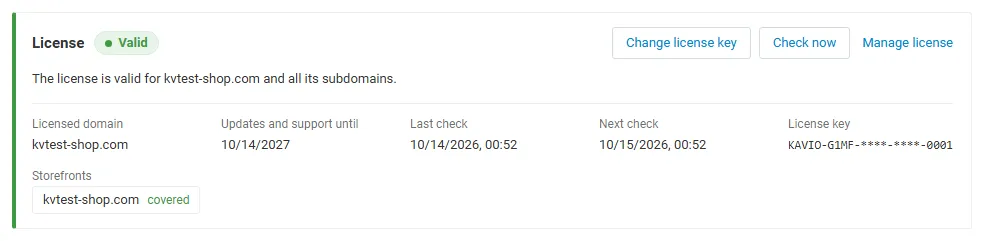
The License card shows:
- the status in color: green when valid, blue for a development host or the 14-day period before a key is required (with the days left), amber when the license server could not be reached (with the days left) or a Marketplace number is still being verified, red when the add-on is switched off;
- in plain words what the status means and, when the add-on is (or will be) switched off, what stops: feed URLs answer 404 and scheduled generation is paused. Feeds, rules, category mapping, product fields and reports in the admin panel and product saves keep working;
- the licensed domain, every storefront with its result (covered, development host, not covered), the end of the updates and support period, the last and the next check, and the key in use (masked);
- the actions Enter license key / Change license key (opens the License tab), Check now (verifies at once and stays on the page), Manage license (your licenses on cs-cart.kaviolabs.com) and, without a valid license, Buy a license.
In Add-ons → Manage add-ons the add-on’s row shows a small license badge next to its name, for example License: Valid or License: Pending · 9 days left.
The add-on’s own admin pages (the feed list, the feed editor, the category mapping, the rules and the validation report) show a compact license status line at the top: a small green License: Valid chip (blue for a development host, amber while a Marketplace number is being verified) when licensed, and a banner with the status, what is switched off and the actions otherwise.
| Setting | Description |
|---|---|
| License key | Your Kavio Labs license key (KAVIO-XXXX-XXXX-XXXX-XXXX, from My licenses on cs-cart.kaviolabs.com) or your CS-Cart Marketplace license number. If you entered the Marketplace license number in Add-ons → Manage add-ons (the add-on’s license field), leave this empty: the add-on uses that number. |
| License status | Points to the License card and explains what the check sends. |
What the license covers. A license is bound to the base domain you entered at purchase (for example example.com) and covers every subdomain of it (www.example.com, shop.example.com, staging.example.com). Local development hosts are always allowed: localhost, 127.0.0.1 and other private IP addresses, and host names ending in .localhost, .test, .local, .example or .invalid. A store on a different base domain needs its own license. If you move your store to a new domain, contact support.
When the add-on checks. When you save the key, and then once a day. The check runs only in the admin panel (on a page you open) or from cron, never while customers browse the storefront, and takes a few seconds at most. A cron job keeps the license verified even when nobody opens the admin panel:
php /path/to/store/admin.php --dispatch=kv_google_merchant_feed_pro_license.checkWhat is sent. The check sends this to https://cs-cart.kaviolabs.com and nothing else: the license key, the add-on ID and version, the host names of your storefronts, your CS-Cart version and edition, and a random one-time value. No customer, order or personal data is sent. The server answers with a digitally signed result, so a forged answer is ignored.
Statuses.
| Status (card) | Color | What happens |
|---|---|---|
| Valid | Green | The license is valid for this domain. Everything works. |
| Development host | Blue | The store runs on a local development host, which every license covers. Everything works. |
| Pending verification | Amber | A CS-Cart Marketplace license number was accepted, but the Marketplace has not confirmed it yet. Everything works. |
| Pending · N days left | Blue | No verified key yet (a new installation, or right after upgrading from 1.0.x). Everything works for 14 days. |
| Grace period · N days left | Amber | The last checks failed (for example a network problem). The add-on keeps working for 14 days after the first failed check. |
| Partly valid | Amber | (CS-Cart with several storefronts) Some storefronts run on another base domain. The feeds of those storefronts are not served or generated. |
| Not activated, Invalid key, Revoked, Domain mismatch, Not verified | Red | The feed URLs answer “404 Feed not available” and scheduled generation (console cron and cron URL) skips the feeds (status “paused”). The admin panel keeps working: feeds, rules, category mapping, product fields, Generate now and the validation report. Product saves are not affected. Merchant Center keeps the products it fetched last until they expire. Domain mismatch shows the licensed domain next to the domain your store runs on. |
When your updates and support period ends, the add-on keeps working. Only updates and support stop.
License information appears in the admin panel only, and only for administrators who may manage add-ons; vendors (Multi-Vendor) and customers never see it. When the add-on is switched off, other admin pages also show a notice once per session with a link to the add-on page; the add-on page itself shows the card instead.