

Installation
Requirements
Section titled “Requirements”- CS-Cart or CS-Cart Multi-Vendor 4.17.2 – 4.22.x.
- PHP 7.4 to 8.3 (within the range your CS-Cart version supports), with cURL (standard).
- The core add-on Maps and geolocation (installed by default). On Multi-Vendor, Vendor locations is supported when you use it.
- Outgoing HTTPS from your server to the geocoding service you choose (public Nominatim / Photon or your own server).
Install
Section titled “Install”- Download the add-on archive
kv_maps_geo_cost_saver-1.0.0.zipfrom your Kavio Labs account (My licenses > Downloads). - In the admin panel open Add-ons > Manage add-ons, click the + button (Upload & install add-on) and choose the archive.
- The add-on is installed and active. It creates four small tables (
kv_mgcs_*). The storefront switches to OpenStreetMap maps at once; the admin panel keeps your current provider until you change it. - Open the add-on’s License tab and enter your license key (see License).
- Add the cron command shown on the Cron tab to your server (every 15 minutes is enough). It fills missing coordinates and cleans the cache.
- Open Website > Maps cost saver to see the savings dashboard and to test an address.
Your Google or Yandex settings in “Maps and geolocation” are never changed. Switching the add-on off or uninstalling it brings them back immediately.
Privileges
Section titled “Privileges”The dashboard and its tools need the core settings privileges (View settings to open it, Manage settings for the buttons). The geocoding endpoint used by the map scripts is open to every signed-in administrator and, on Multi-Vendor, to vendors (their address maps); vendors do not see the dashboard.
Upgrading
Section titled “Upgrading”Upload the new archive in Add-ons > Manage add-ons the same way. The add-on brings its database tables, settings and texts up to date on the next admin page view (self-healing upgrade); your settings, cache and savings history are kept.
Uninstalling
Section titled “Uninstalling”Add-ons > Manage add-ons > the add-on’s menu > Uninstall. This removes the add-on’s tables (cache, usage counters, coordinate jobs, rate limits), its settings and texts. Coordinates already filled into store locations and vendor locations stay. Maps go back to the provider set in “Maps and geolocation”.
License
Section titled “License”The add-on checks its license for your store’s domain once a day from the admin panel (never from the storefront). The license card at the top of the add-on page shows the status, the licensed domain and the update period.
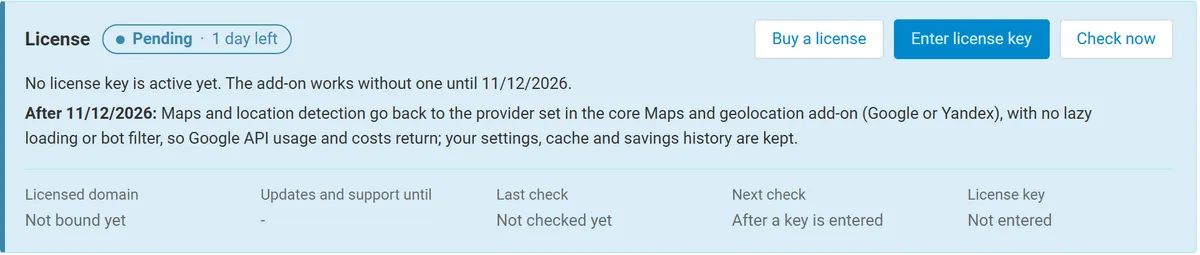
- Trial: without a key the add-on runs for 14 days.
- Without a valid license: maps and location detection go back to the provider set in the core Maps and geolocation add-on (Google or Yandex), with no lazy loading or bot filter, so Google API usage and costs return; your settings, cache and savings history are kept and the dashboard keeps working.
- Development and staging hosts (localhost, private IP addresses,
*.local,*.test) are always free; subdomains of the licensed domain are included.