

Configuration
There are two places: the add-on settings (Add-ons > Manage add-ons > Restaurant Online Ordering) for rules that apply to the whole store or marketplace, and Orders > Restaurant settings for each restaurant.
Add-on settings
Section titled “Add-on settings”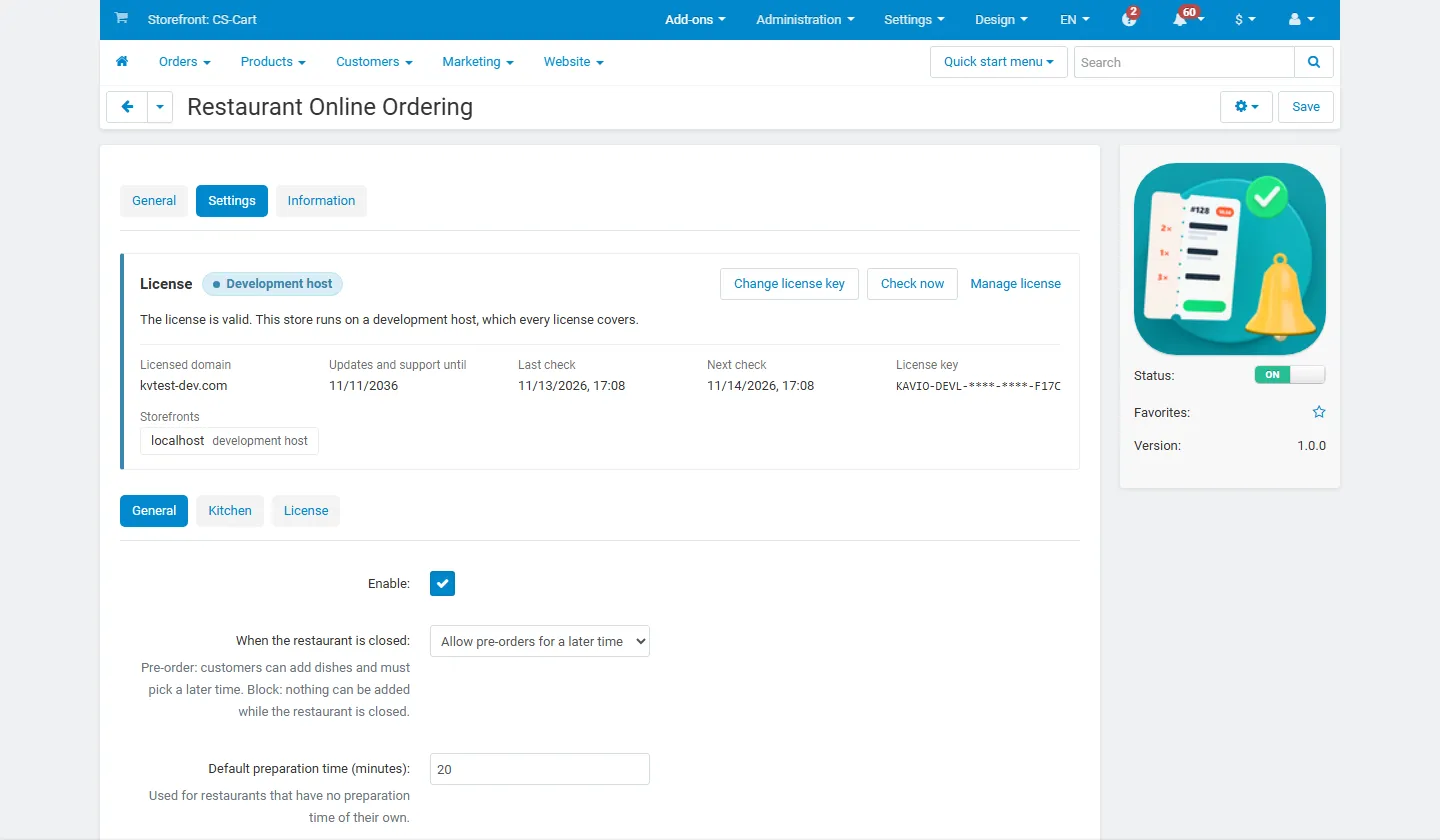
General
Section titled “General”| Setting | What it does |
|---|---|
| Enable | Switches the add-on off without uninstalling it. |
| When the restaurant is closed | Allow pre-orders for a later time (default): customers can add dishes and must pick a later time at checkout. Block adding to the cart: nothing can be added while the restaurant is closed. |
| Default preparation time | Minutes used by restaurants that have no preparation time of their own (default 20). |
| Last order before closing | No ASAP orders and no time slots in the last minutes before closing (default 10). |
| Enforce the minimum order | Refuses to place an order below the restaurant’s minimum (default on). |
| Vendors manage their own restaurant | Multi-Vendor: vendors set their own hours, preparation time, minimum order, choices and sold-out dishes. The kitchen board is always available to vendors. |
Kitchen
Section titled “Kitchen”| Setting | What it does |
|---|---|
| Order status: New / Preparing / Ready / Out for delivery / Done | Which order status each board column stands for. The installer fills Preparing, Ready and Out for delivery with the three statuses it creates; New is Open and Done is Complete by default. Moving a card on the board sets the mapped status; changing the status anywhere else (order page, API, other add-on) moves the card. Leave a step empty to move the card without changing the order status. |
| E-mail the customer on every kitchen step | Uses the customer notification of the mapped order status. |
| Kitchen board refresh | Seconds between two refreshes (5 to 300, default 15). |
| Sound alert for new orders | One short beep per new order (the browser needs one click on the page first). |
| Customer tracking refresh | Seconds between two refreshes of the order status page (default 30). |
On Ultimate the General and Kitchen values can differ per storefront.
Restaurant settings (per restaurant)
Section titled “Restaurant settings (per restaurant)”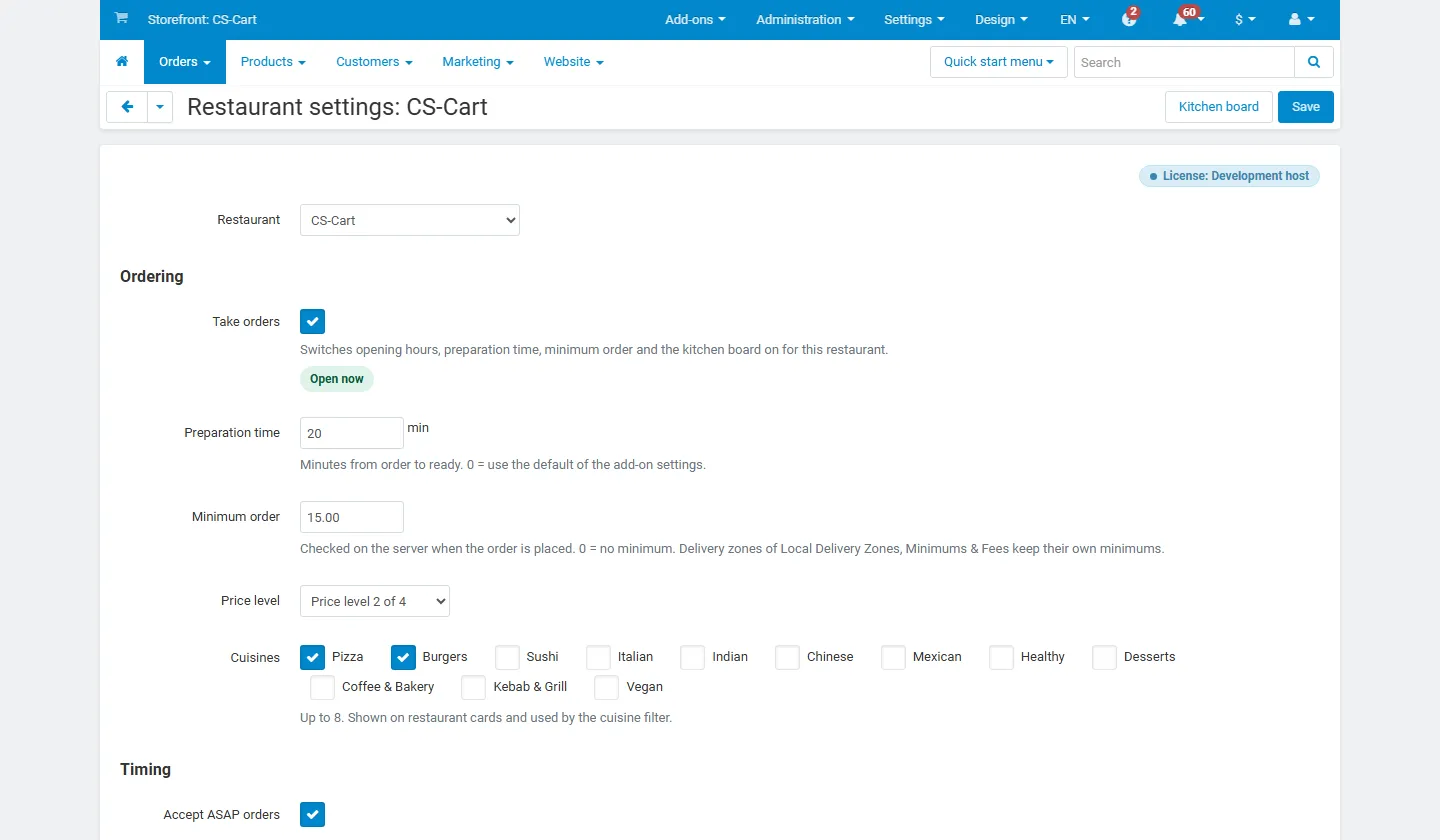
On Multi-Vendor the vendor opens Orders > Restaurant settings in the vendor panel; the administrator picks the restaurant at the top of the page. On Ultimate every storefront is a restaurant (a branch of a chain).
| Field | What it does |
|---|---|
| Take orders | Turns the rules on for this restaurant. A restaurant that is off has no hours, no minimum and no kitchen board. |
| Preparation time | Minutes from order to ready. 0 uses the add-on default. Shown to the customer as “Ready in 20-30 min”. |
| Minimum order | Order value (of this restaurant’s dishes) below which an order is refused. 0 = no minimum. |
| Price level | 1 to 4 dots on the restaurant card. |
| Cuisines | Up to eight, from the list kept in Orders > Restaurant settings > Cuisines (administrator). |
| Accept ASAP orders / scheduled orders | Switch either way of ordering off. |
| Order ahead up to | Days ahead a customer may schedule (1 to 30). |
| Time step | Minutes between selectable times (5 to 120). |
| Orders per time | Maximum scheduled orders for one time. 0 = unlimited. |
| Lead time | Extra minutes on top of the preparation time before the first selectable time. |
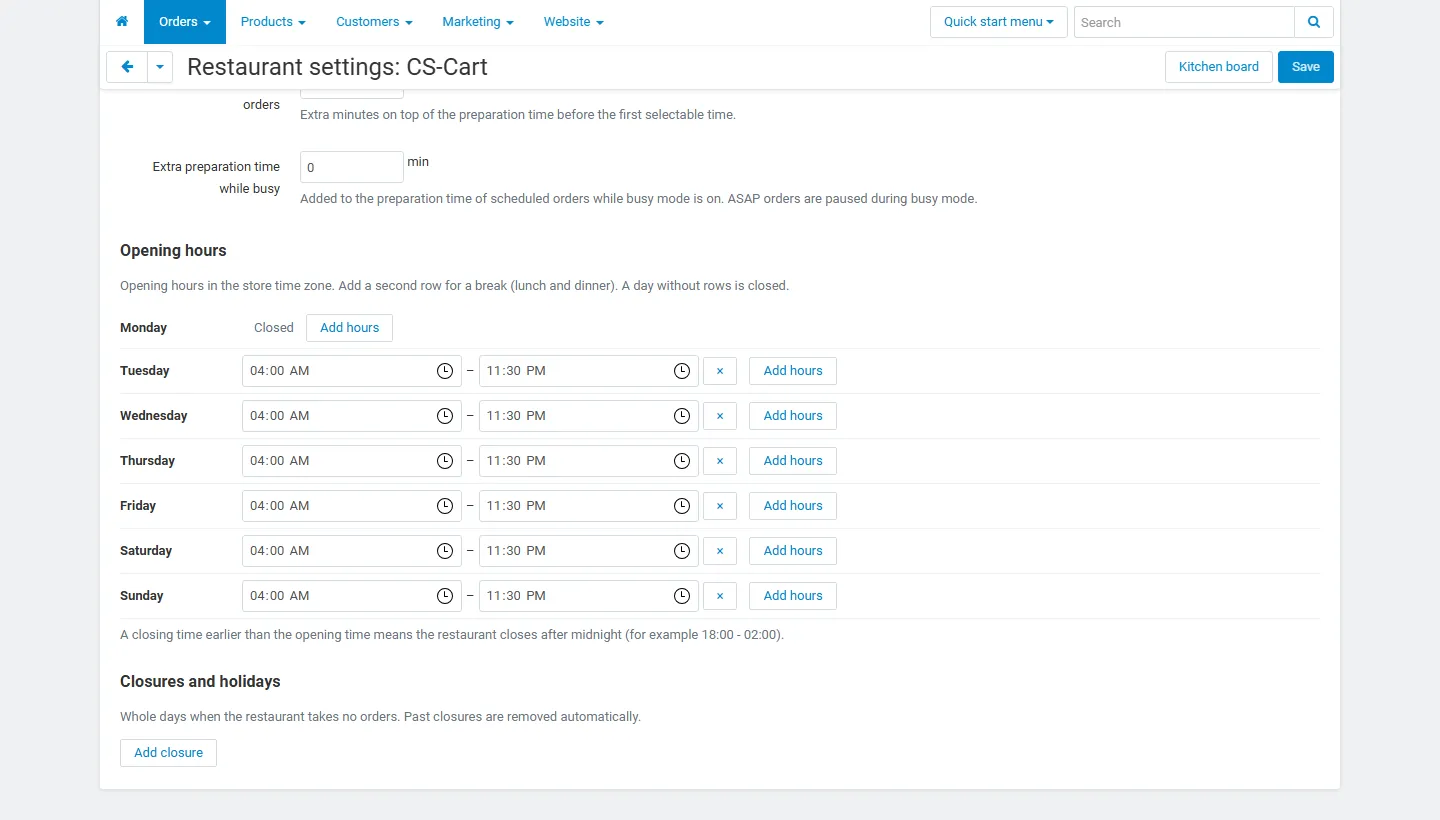
| Extra preparation time while busy | Added to the preparation time while busy mode is on. |
| Opening hours | Per weekday, up to three rows (for example lunch and dinner). A closing time earlier than the opening time means after midnight (18:00 - 02:00). A day without rows is closed. Times are in the store time zone (Settings > Appearance). |
| Closures and holidays | Whole days without orders. Past closures disappear by themselves. |
Menu choices on a dish
Section titled “Menu choices on a dish”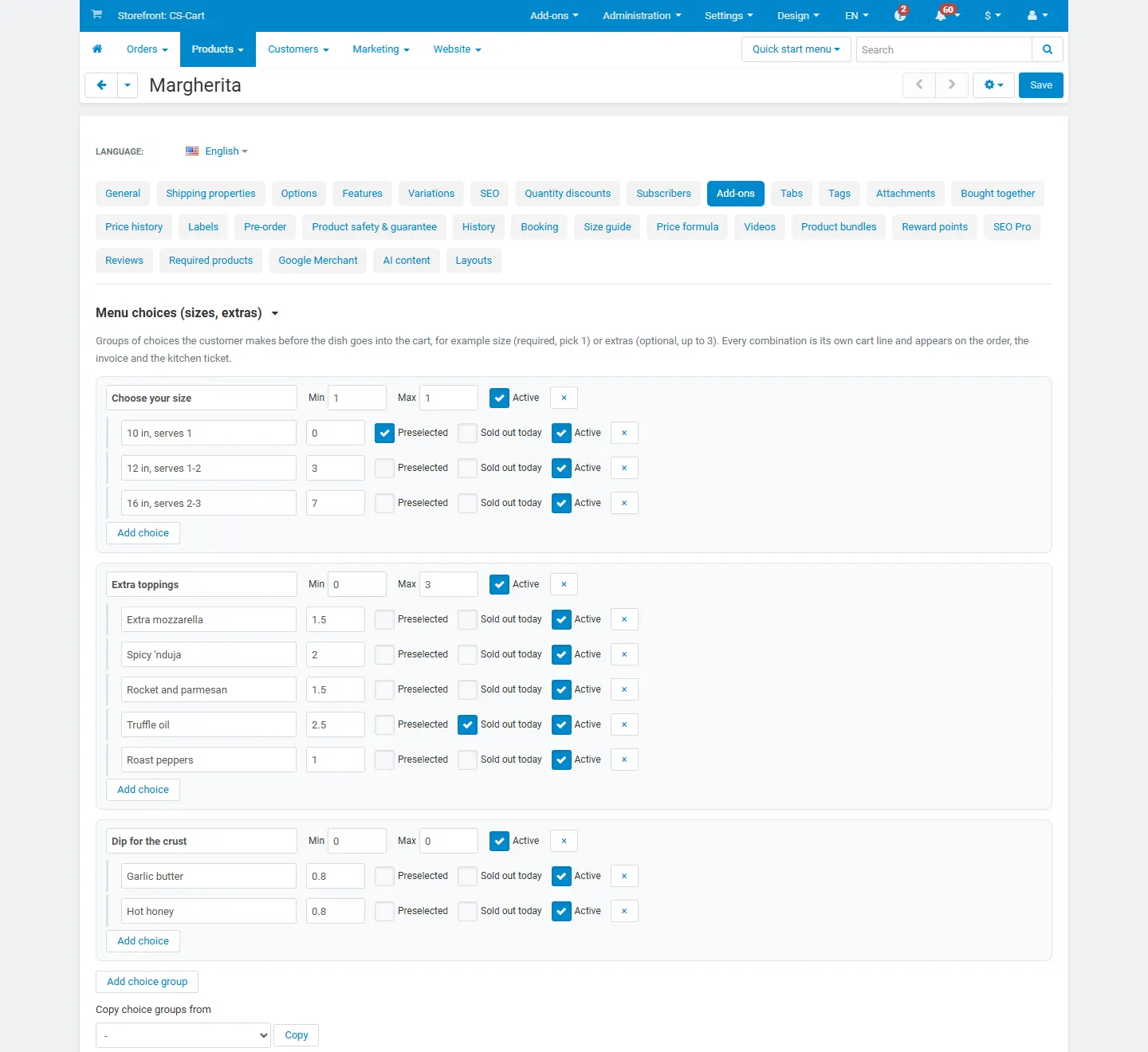
On the product edit page, tab Add-ons, section Menu choices (sizes, extras):
- Group: a name, a minimum and a maximum number of choices (1 and 1 = required single choice, 0 and 3 = optional up to three, max 0 = any number) and an active switch.
- Choice: name, price, Preselected, Sold out today, active.
- Copy all groups from another dish of the same restaurant with Copy choice groups from.
- Groups are copied when a product is cloned and removed when it is deleted.
Orders > Restaurant settings > Sold out today lists every choice with one switch each. A sold-out choice cannot be ordered until midnight (store time zone) and is shown as “Sold out today”.
Opening hours and the full page cache
Section titled “Opening hours and the full page cache”Nothing time-dependent is stored in cached pages: the open / closed label, the ETA and “opens at 18:00” are read from a small live endpoint by the page script. Pages that print menu data refresh when menus, choices or restaurant settings change.