

Configuration
Open Add-ons → Manage add-ons → Serial Numbers & Warranty Tracker → Settings. On CS-Cart Ultimate the settings can differ per storefront.
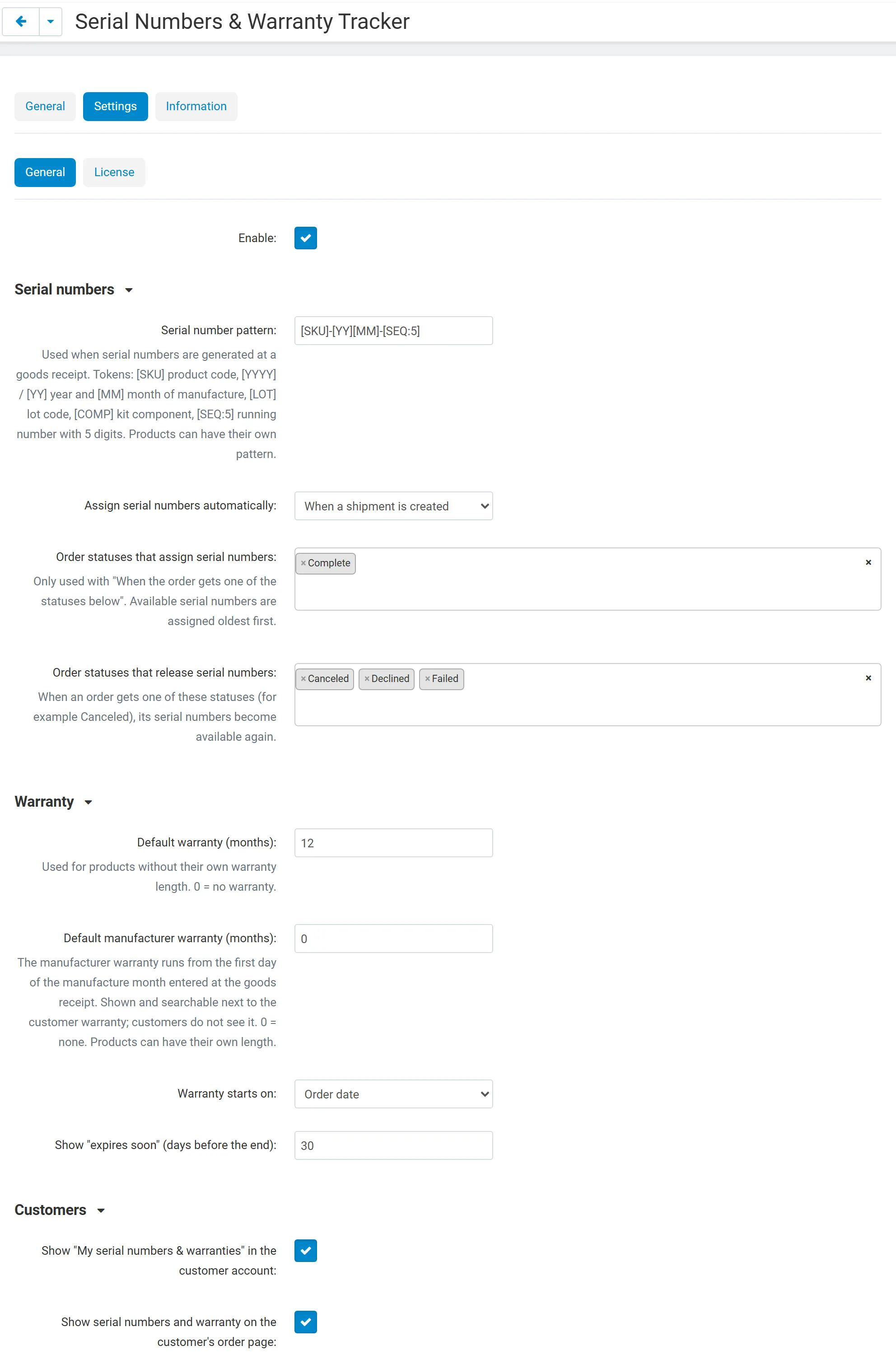
General
Section titled “General”| Setting | Default | What it does |
|---|---|---|
| Enable | On | Switches the add-on on and off without uninstalling it. |
Serial numbers
Section titled “Serial numbers”| Setting | Default | What it does |
|---|---|---|
| Serial number pattern | [SKU]-[YY][MM]-[SEQ:5] |
Pattern for generated serial numbers. Tokens: [SKU] product code, [YYYY] / [YY] year and [MM] month of manufacture (of the receipt date when no date code is entered; for a week code the month that holds the week’s Thursday, so week 01 of 2026 gives 2026), [WW] ISO week of a week code (for a month code the ISO week of the month’s first Thursday, for a receipt without a code the week of the receipt date), [MFGCODE] the manufacturer date code as printed (letters and digits only), [LOT] lot code, [COMP] kit component, [SEQ:n] running number with n digits (1–12). Exactly one [SEQ] is required. Each product can have its own pattern. |
| Assign serial numbers automatically | When a shipment is created | When a shipment is created: the shipped units of each tracked line get serial numbers in stock, oldest first. When the order gets one of the statuses below: all units of the order get serial numbers when the order reaches a chosen status. No: only by hand or by scanning on the order page. |
| Order statuses that assign serial numbers | Complete | Used with the status option above. |
| Order statuses that release serial numbers | Canceled, Declined, Failed | When an order gets one of these statuses, its serial numbers go back to stock. Deleted orders always release their serial numbers. |
The running number continues per pattern: after UV27-4K-2609-00006 the next receipt of the same month starts at 00007. Numbers that already exist (for example scanned ones) are skipped.
Warranty
Section titled “Warranty”| Setting | Default | What it does |
|---|---|---|
| Default warranty (months) | 12 | Customer warranty for products without their own length. 0 = no warranty. |
| Default manufacturer warranty (months) | 0 | Manufacturer warranty, counted from the manufacture date of each unit (the 1st of the month for a month code, the Monday for a week code). Shown and searchable in the admin panel next to the customer warranty; customers never see it. 0 = none. |
| Warranty starts on | Order date | Order date, Date the serial number is assigned (dispatch) or Manufacture date (from the unit’s manufacturer date code: the 1st of the month or the Monday of the week). Each product can override it. |
| Show “expires soon” (days before the end) | 30 | Units whose warranty ends within this many days are flagged “ends soon” in the register and in the customer’s account. |
Two warranties per unit. The customer warranty is what you give the buyer (from the sale or dispatch). The manufacturer warranty is what the factory gives you (from the manufacture date on the factory sticker), so you know whether a faulty unit can still go back to the supplier, even when the customer warranty has ended or the unit is still in stock.
The customer warranty is calculated when a serial number is linked to an order and stored with the unit. 12 months from 15 January end on 14 January of the next year. You can correct the start and end of any unit on its page.
Customers
Section titled “Customers”| Setting | Default | What it does |
|---|---|---|
| Show “My serial numbers & warranties” in the customer account | On | Adds the page and a link in the account menu. |
| Show serial numbers and warranty on the customer’s order page | On | Lists the serial numbers and warranty under each order line. |
| Public warranty check page | On | Page index.php?dispatch=kv_serial_warranty.check: enter a serial number, see the product and its warranty state. Never shows customer data. Limited to 20 checks per hour per visitor. Add it to a menu or the footer with Design → Menus. |
| Public check finds only this storefront’s serial numbers (CS-Cart Ultimate) | On | Per storefront. On: a visitor of a storefront finds only serial numbers sold on that storefront’s orders, or in stock for products of its company; serial numbers of your other storefronts are reported as unknown, so a product name never shows up on the wrong storefront. Off: the check searches the serial numbers of every storefront. Not shown on Multi-Vendor (one marketplace storefront). |
Vendors
Section titled “Vendors”Multi-Vendor only. Vendors manage the serial numbers of their products (on by default) gives vendors the serial number pages in the vendor panel. Vendors see and change only the serial numbers, receipts and claims of their own products and orders; serial numbers are unique per vendor.
Product settings
Section titled “Product settings”Open a product and the Serial numbers & warranty tab:
| Field | What it does |
|---|---|
| Serial numbers | Track a serial number for every unit of this product. |
| Warranty (months) | Customer warranty. Empty = the default. 0 = no warranty. |
| Manufacturer warranty (months) | From the manufacture date. Empty = the default. 0 = none. Changing it recalculates the manufacturer warranty of every unit of the product, except end dates set by hand. |
| Manufacturer date code format | How a date code made only of digits is read: Month and year (default), MMYY, YYWW (2610 = 2026, week 10), YYYYWW, WWYY or Only explicit forms. 2026-03, 03/2026 and 2026-W10 work with every format. See Manufacturer date codes. |
| Warranty starts on | Default, order date, dispatch date or manufacture date. |
| Kit components | For a product sold as a kit (for example a recorder and two cameras): one component per line, up to 20. Every unit sold then carries one serial number per component. Leave empty for a normal product. |
| Pattern | Own pattern for this product (empty = the default). The tab shows how the next serial number looks. For kits, [COMP] adds the component to the serial number. |
The tab also shows the units in stock, sold and ending soon, with a Receive stock button.
License
Section titled “License”The add-on checks its license key for your store’s domain once a day from the admin panel (never from the storefront). Development hosts such as localhost always work.
| Key | Enter it in Settings → License, or use the CS-Cart Marketplace license number in Add-ons → Manage add-ons. |
| Check now | The Check now button on the License tab repeats the check at once. |
| Server not reachable | The add-on keeps working during a grace period. |
Without a valid license: customers no longer see serial numbers and warranties in their account, on order pages or on the warranty check page, serial numbers are no longer assigned automatically and labels cannot be printed; your serial numbers, goods receipts, claims and order assignments stay in the admin panel, where you can still search, edit, assign and export them.
Client IP (limits behind a proxy)
Section titled “Client IP (limits behind a proxy)”Rate limits and IP rules count requests per visitor address. A forwarded header such as X-Forwarded-For can be sent by anyone, so the add-on only reads it when the connection really comes from a proxy. This works out of the box behind Cloudflare and behind private reverse proxies (nginx, Varnish, a load balancer on a loopback or private address). Open the Client IP tab of the add-on settings only if you need to change it:
| Setting | Default | Description |
|---|---|---|
| Where the visitor IP address comes from | Automatic: Cloudflare and private reverse proxies | Automatic: CF-Connecting-IP when the connection comes from a Cloudflare address (official ranges built in); X-Forwarded-For (read from the right, proxies skipped, the first other address is the visitor) when the connection comes from a loopback or private address (127.0.0.0/8, ::1, 10/8, 172.16/12, 192.168/16, fc00::/7) or a listed proxy. Automatic, plus the proxies listed below: same. Direct connection only: every forwarded header is ignored. |
| Trusted proxies | empty | Only for proxies with a public address: addresses or CIDR blocks, one per line or separated by commas (IPv4 and IPv6). |
IPv6 visitors are counted per /64 network. To set it once for every Kavio Labs add-on, put this in config.local.php (a value there wins over the add-on setting):
$config['kv_client_ip_mode'] = 'cloudflare'; // cloudflare (automatic) | proxy | direct$config['kv_client_ip_trusted_proxies'] = '203.0.113.50'; // public proxy addresses only