

Configuration
Open Add-ons → Manage add-ons → Vendor Subdomains & Custom Domains (or click the add-on name). Settings are grouped in tabs. The rules per vendor plan are on their own page: Vendors → Vendor domains → Plan rules.
General
Section titled “General”| Setting | Default | Description |
|---|---|---|
| Enable | On | Master switch. Off: vendor hosts are not served (CS-Cart redirects them to the marketplace). Domain records stay. |
| Base domain for subdomains | empty | Vendor subdomains are label.base-domain. Empty means your marketplace host without www. and without a port (for example example.com). Fill it when the vendor stores live below another domain, for example stores.example.com. |
| Minimum subdomain length | 3 | Shortest label a vendor can choose. |
| Reserved subdomains | www, admin, api, mail, ... |
Labels vendors cannot take. Separate with commas or spaces. |
| Vendors can manage their own domains | On | Off: only administrators add and change domains; vendors lose the page. |
| Trust the X-Forwarded-Host header | Off | Leave off unless a reverse proxy in front of the store changes the Host header and sends the visitor’s host in X-Forwarded-Host. With it on, anyone who can send that header can make a vendor page appear under another host, which matters when a cache sits in front of the store. |
Approval and plans
Section titled “Approval and plans”| Setting | Default | Description |
|---|---|---|
| Subdomain approval | Automatic | Automatic: a new subdomain is live at once. Manual: it waits for an administrator. |
| Administrator approves custom domains | On | On: a custom domain waits for approval after its DNS check passed. Off: it goes live as soon as DNS passes. |
| Subdomains allowed by default | On | Used for vendors whose plan has no rule, and when the Vendor plans add-on is not active. |
| Custom domains allowed by default | Off | Same. |
| Domains per vendor by default | 3 | Subdomains and custom domains together. |
Plan rules
Section titled “Plan rules”Vendors → Vendor domains → Plan rules lists every vendor plan with three controls: Subdomain allowed, Custom domain allowed and Domains per vendor. The same fields appear on the Restrictions tab of the plan editor. A plan without a rule uses the defaults above (shown as “defaults”).
What a rule changes:
- A vendor can only add domain types its plan allows, up to the domain limit. Administrators can add any domain for a vendor.
- A domain whose type is no longer allowed (the vendor moved to another plan) keeps its record and status but is not served. The vendor sees “Not served: the plan does not include this domain type”. It is served again when the plan allows it.
Without the Vendor plans add-on the defaults apply to every vendor.
DNS check
Section titled “DNS check”| Setting | Description |
|---|---|
| CNAME target | The host name vendors point their domain to (for example domains.example.com). Leave empty together with the IP list to skip the routing check and verify ownership only; custom domains are then never used as canonical addresses (canonical mode Vendor domain falls back to the subdomain or the marketplace). |
| Server IP addresses | IP addresses vendors can use in an A record (for apex domains, which cannot be a CNAME). An A or AAAA record in this list passes the routing check. |
| Failed checks before suspension | An active custom domain is suspended after this many failed daily re-checks in a row (default 3) and comes back by itself when DNS is healthy again. |
| Note for vendors | Text shown under the DNS steps on the vendor page. |
Every custom domain is verified in two ways:
- Ownership. A TXT record
_kvdomain.<domain>with the valuekv-site-verification=<token>. The token is unique per domain and shown on the vendor’s page. - Routing (only when a CNAME target or IPs are set). A CNAME to the target, or an A/AAAA record from the IP list.
Storefront and SEO
Section titled “Storefront and SEO”| Setting | Default | Description |
|---|---|---|
| Home page of a vendor host | Vendor page | What the root of a vendor host shows: the vendor page (profile and products) or the vendor’s product list. |
| Canonical URLs | Marketplace domain | Marketplace domain: every page on a vendor host names the marketplace URL as canonical, so vendor hosts add no duplicate content. Vendor domain: pages name the vendor’s primary host (a custom domain only when a CNAME target or server IPs are set, its last DNS check found it pointing to this store and the store has served it, so a domain that points elsewhere is never named; otherwise the subdomain, or the host the vendor marked as main among the eligible ones), and the marketplace pages of that vendor (product and vendor pages) name it too. Hreflang links and JSON-LD URLs follow the same rule. |
| Sitemap per vendor host | On | In canonical mode Vendor domain only (in mode Marketplace domain every page names a marketplace URL, so a vendor-host sitemap would list only alternates): serves sitemap.xml (home, vendor page, categories with the vendor’s products, products; an index with sitemap-N.xml files above 5000 products) and a robots.txt with the sitemap line on every vendor host. |
| Pages that always open on the marketplace domain | checkout, auth, profiles, orders, wishlist, order_management, gdpr, vendor_communication, companies.catalog, companies.apply_for_vendor, product_features.compare, ... |
Controllers (checkout) or controller.mode pairs (companies.catalog) that need the visitor session. Links to them point to the marketplace domain and requests for them on a vendor host are redirected. Do not remove checkout, auth or profiles. |
robots.txt per vendor host needs the request to reach CS-Cart. CS-Cart ships a static robots.txt in the store root; the web server serves it for every host. To give vendor hosts their own file, delete the static file (the CS-Cart robots editor then serves the marketplace rules from the database) or route /robots.txt to index.php. sitemap.xml does not have this limit.
License
Section titled “License”The license status is shown in a License card at the top of the add-on page, above the tabs. The License tab holds the key itself. The key is stored once for the whole installation.
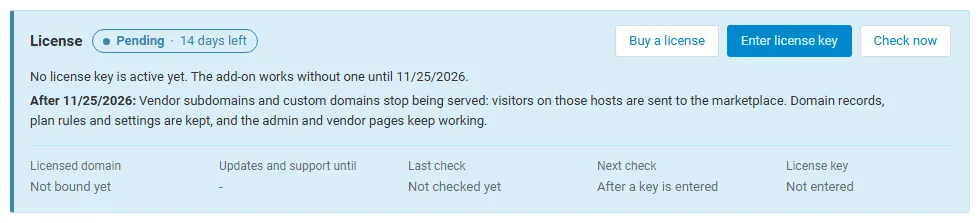
The License card shows:
- the status in color: green when valid, blue for a development host or the 14-day period before a key is required (with the days left), amber when the license server could not be reached or a Marketplace number is still being verified, red when the add-on is switched off;
- in plain words what the status means and what stops when the add-on is switched off: vendor subdomains and custom domains stop being served, and visitors on those hosts are sent to the marketplace; records, plan rules and settings are kept, and the admin and vendor pages keep working;
- the licensed domain, every storefront with its result, the end of the updates and support period, the last and the next check, and the key in use (masked);
- the actions Enter license key / Change license key, Check now, Manage license and, without a valid license, Buy a license.
| Setting | Description |
|---|---|
| License key | Your Kavio Labs license key (KAVIO-XXXX-XXXX-XXXX-XXXX, from My licenses on cs-cart.kaviolabs.com) or your CS-Cart Marketplace license number. If you entered the Marketplace license number in Add-ons → Manage add-ons, leave this empty. |
| License status | Points to the License card and explains what the check sends. |
What the license covers. A license is bound to the base domain you entered at purchase and covers every subdomain of it. Vendors’ own domains are covered by the license of the marketplace and need no license of their own. Local development hosts are always allowed (localhost, private IP addresses, host names ending in .localhost, .test, .local, .example, .invalid).
When the add-on checks. When you save the key, and then once a day, from the admin panel or cron, never while visitors browse. A cron job keeps the license verified even when nobody opens the admin panel:
php /path/to/store/admin.php --dispatch=kv_vendor_domains_license.checkWhat is sent. The license key, the add-on ID and version, the host names of your storefronts, your CS-Cart version and edition, and a random one-time value. No vendor, customer, order or domain data. The answer is digitally signed.
| Status (card) | What happens |
|---|---|
| Valid, Development host, Pending verification | Everything works. |
| Pending · N days left | No verified key yet. Everything works for 14 days. |
| Grace period · N days left | The license server could not be reached. Everything works for 14 days after the first failed check. |
| Not activated, Invalid key, Revoked, Domain mismatch, Not verified | Vendor hosts are not served: CS-Cart redirects them to the marketplace; sitemap and robots on vendor hosts are off. Domains, plan rules and settings stay; vendors and administrators can still manage domains. |
When your updates and support period ends, the add-on keeps working. Only updates and support stop.
php /path/to/store/admin.php --dispatch=kv_vendor_domains.recheckOnce a day. It re-checks every active and suspended custom domain, suspends the ones that failed the configured number of checks in a row, and restores suspended ones whose DNS is healthy again. Re-check all custom domains in the tools menu of the domain list does the same on demand.
Privileges
Section titled “Privileges”The add-on adds two privileges in the Vendors section: Vendor domains: Can view and Vendor domains: Can edit. Administrators who may manage vendors get them by default. Vendor users reach their own page when Vendors can manage their own domains is on; they always see and change their own company’s domains only.