

Usage
Add a leaderboard to the storefront
Section titled “Add a leaderboard to the storefront”- Open Design > Layouts and the page you want (for example Homepage, or Categories for category pages).
- In a grid, click + Add block > Create new block and choose Vendor leaderboard.
- Set the block:
- Template: Leaderboard: vendor cards, Leaderboard: podium or Leaderboard: compact list;
- Metric: Sales, Orders, Rating, New vendors or Most improved;
- Period: Last 7, 30 or 90 days, or All time (New vendors ignores the period; Most improved uses 30 days for All time);
- Limit: number of vendors (1 to 50);
- Category scope: Whole marketplace, Current category (category pages) or Selected category (pick one). Category leaderboards exist for Sales and Orders.
- Save. The block shows the vendors of the latest snapshot.
Tip: a “Top vendors” landing page is a CMS page (Website > Pages) with several leaderboard blocks on its layout location: top sellers this month, top rated, rising vendors and new vendors.
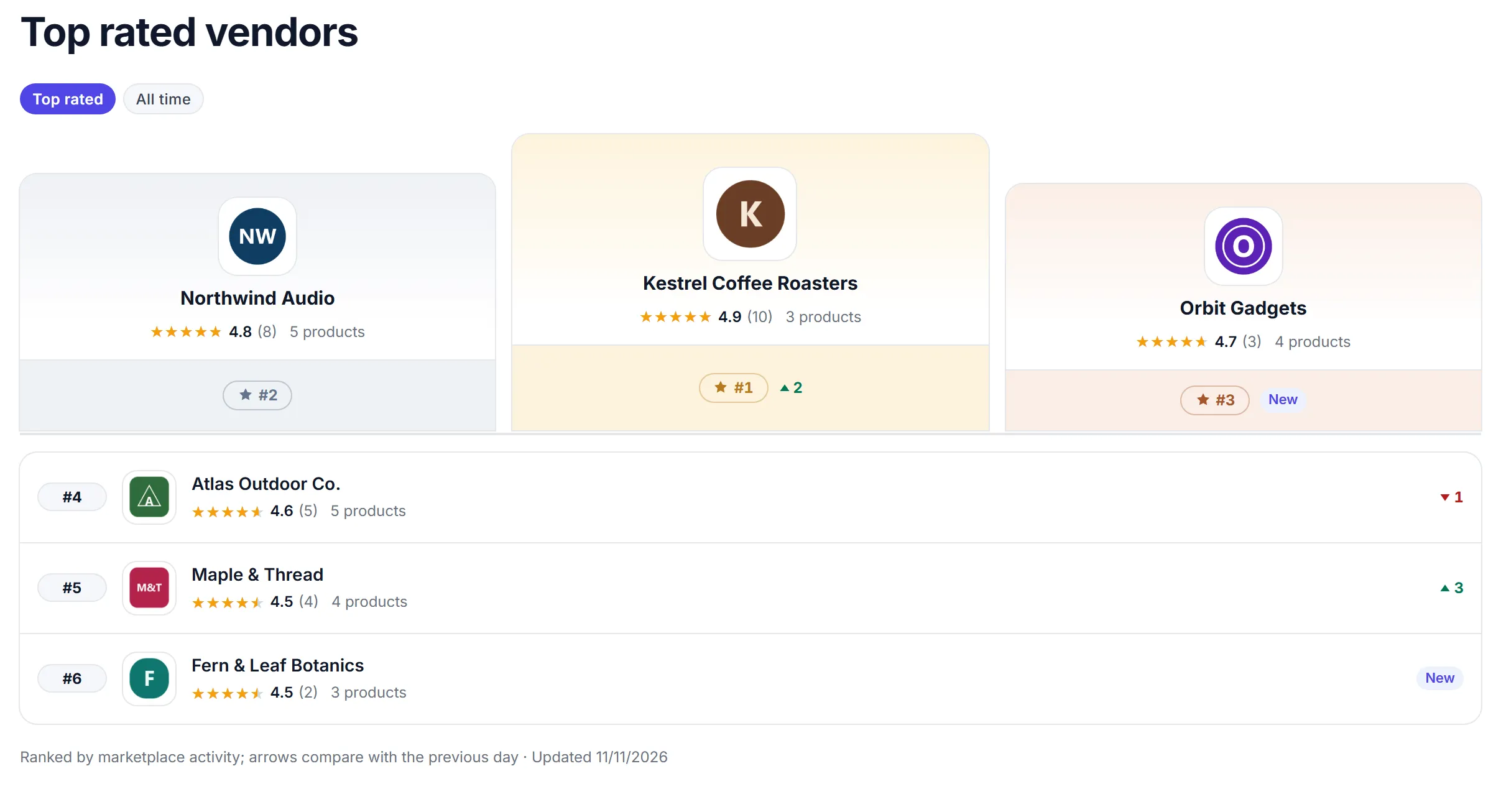
The block caption shows the leaderboard, the period and the category; the footnote shows when the ranking was updated. Shoppers see the vendor’s position, logo, rating and product count, never sales or order figures. A block with nobody ranked stays hidden.
Admin leaderboards
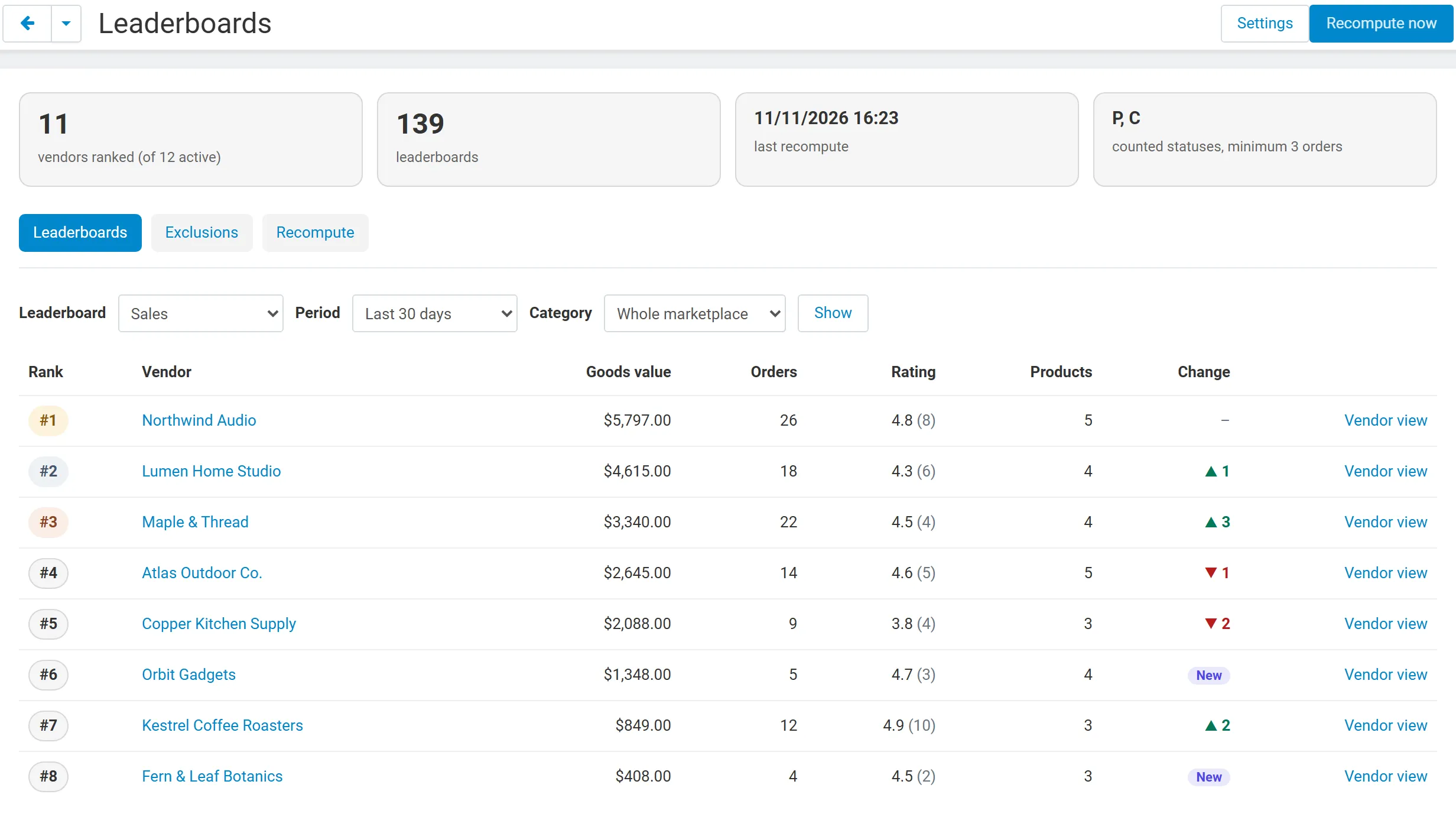
Section titled “Admin leaderboards”Vendors > Leaderboards shows every leaderboard with its figures, for the marketplace owner only:
- Leaderboards tab: choose the leaderboard, period and category. The table lists rank, vendor, the score (goods value, orders, weighted rating, places gained or join date), orders, rating, products and the change since the previous run. Vendor view opens a vendor’s My ranking page.
- Exclusions tab: add or remove excluded vendors with the vendor picker.
- Recompute tab: the cron command and the log of the last runs (start, who started it, status, vendors read, ranked vendors, rows, time).
- Recompute now rebuilds the snapshot right away; on a large marketplace it starts the run and the rest continues by cron or panel visits. The storefront keeps showing the previous ranking until the new one is complete.
Vendor panel: My ranking
Section titled “Vendor panel: My ranking”Vendors open My ranking (Vendors menu, or Seller tools when the Vendor panel configurator is active). They see:
- their rank in Sales, Orders, Rating and Most improved for the period they pick, with “of N” ranked vendors, the top percentage and the change since the previous update;
- which leaderboards the marketplace shows to shoppers (On storefront) and which stay private;
- a 30-day chart of their rank and their rank a week ago;
- their category ranks;
- why they are not ranked yet, for example “3 of 5 orders in the period”, “at least 3 reviews needed” or “excluded by the marketplace”.
Vendors never see other vendors’ sales, orders or revenue.
Badges
Section titled “Badges”With badges on, the vendors ranked 1 to N in the badge leaderboard get a “Top seller” (or “Top rated”) badge with their rank and period on their store page, and optionally a label on their product cards.
When rankings change
Section titled “When rankings change”Rankings are recomputed once a day (cron, or panel visits after the configured hour) and on Recompute now. Position arrows always compare with the ranking of the previous day, so an extra recompute on the same day does not reset them. Pages that show leaderboards or badges refresh after each recompute, also with the 4.21 full page cache.