

Vendor Onboarding & Registration Builder
Add-on ID: kv_vendor_registration_builder · Edition: Multi-Vendor only · Latest version: 1.0.1 · Compatible with: Multi-Vendor 4.17.2 – 4.22.x, PHP 7.4 – 8.3 · Changelog: view · Product page: Vendor Onboarding & Registration Builder
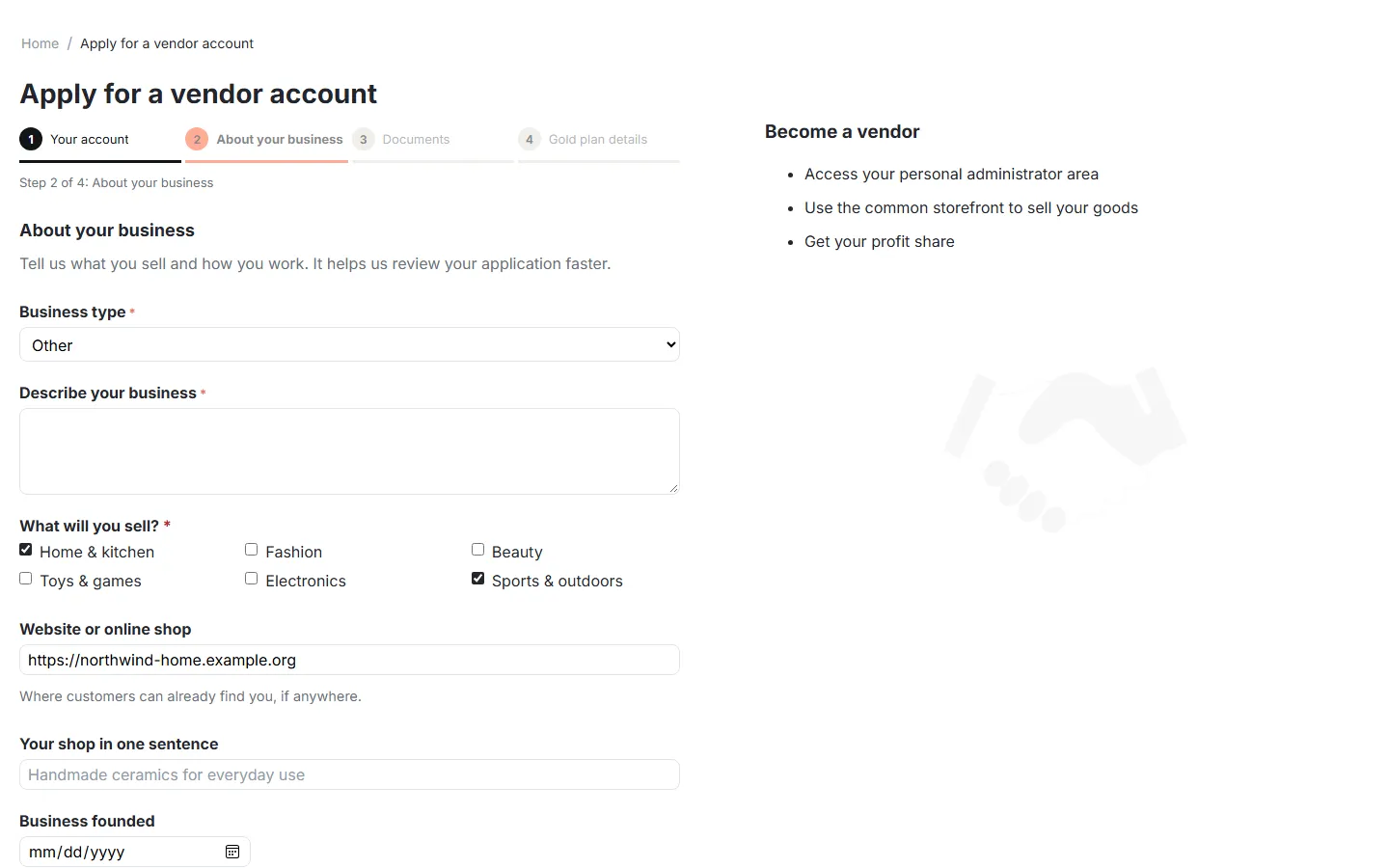
Vendor Onboarding & Registration Builder turns the core “Apply for a vendor account” page into an application form you design yourself. Multi-Vendor itself only asks for the seller profile fields (company, e-mail, name and a few contact fields): no documents, no steps, no conditions and no questions that depend on the vendor plan. This add-on adds your own sections and fields to the core form, keeps the answers with the vendor, and shows them where you approve or disapprove the vendor.
- Form builder: sections and fields under Vendors → Vendor applications → Vendor application form. Field types: text, text area, drop-down list, multiple choice, checkbox, date and file upload. Labels, help texts, placeholders and options per store language.
- Steps with progress: step 1 is the core account form, every section of your form is one more step with Back and Next buttons and a progress bar. Or show everything on one page.
- Conditions: “show this field only if field X equals value”, for example “Describe your business” only when “Business type” is “Other”. Hidden fields are not required and not stored.
- Per vendor plan: limit a section or a field to some vendor plans. The applicant chooses a plan on the form and sees the questions of that plan.
- Validation: required fields, minimum and maximum length, formats (e-mail, web address, phone number, number, letters and digits), valid options only, checked again on the server.
- Documents: file upload fields with allowed file types, maximum size and number of files, a content check (a script renamed to .pdf is refused) and protected storage outside the public web folders. Mark a field as a required document and the applications list shows when it is missing.
- Answers on the vendor page: an Application tab on the vendor page with all answers and documents. Administrators can edit the answers and add or delete files later. Approve and disapprove stay the core buttons.
- Applications list and CSV: Vendors → Vendor applications with status tabs, search, plan, document count and an export with one column per question.
- E-mails with the answers: an e-mail with all answers and file names for your team and a copy for the applicant, next to the core vendor e-mails.
- Privacy: answers and documents of disapproved applications are deleted automatically after the number of days you set; a manual “delete now” helps with data deletion requests.
- Vendor Storefront Pro: optional. Map text fields to the vendor’s storefront profile (tagline, about us, shipping and returns policy, social links) to prefill the profile draft.
Documentation
Section titled “Documentation”| Page | Contents |
|---|---|
| Installation | Requirements, installing, upgrading, uninstalling |
| Configuration | Settings: general, notifications, privacy, license |
| Usage | Building the form, conditions, plans, documents, reviewing applications, CSV, Vendor Storefront Pro |
| Developer notes | Data model, endpoints, hooks, file map |
| FAQ | Common questions |
Compatibility
Section titled “Compatibility”| CS-Cart Multi-Vendor | 4.17.2 – 4.22.x (Multi-Vendor only; the install is refused on CS-Cart) |
| PHP | 7.2.5 – 8.3 (whatever your CS-Cart version supports) |
| Themes | Responsive and themes based on it (Nova and others) |
| Full page cache (4.21) | Supported: the application page is never cached, and nothing the add-on prints depends on the visitor elsewhere |
| Other add-ons | Vendor plans (optional, for per-plan questions), GDPR (its agreement checkbox stays on the last step), Vendor Storefront Pro (optional) |