

Configuration
Open Add-ons → Manage add-ons → Stock Statuses & Lead Times → Settings. On CS-Cart Ultimate the settings can differ per storefront.
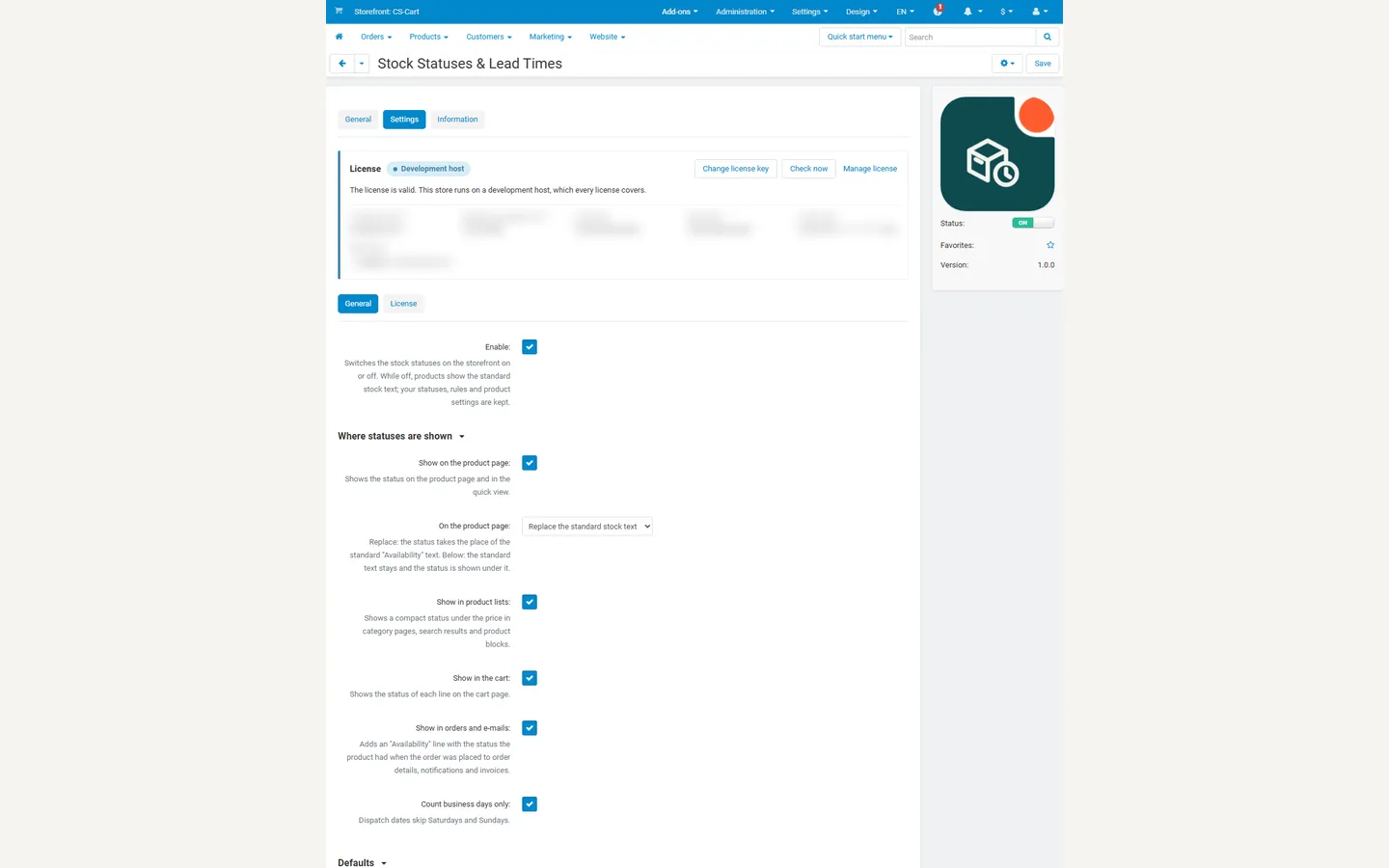
General
Section titled “General”| Setting | Default | What it does |
|---|---|---|
| Enable | On | Switches the stock statuses on the storefront on or off. While off, products show the standard stock text; statuses, rules and product settings are kept. |
Where statuses are shown
Section titled “Where statuses are shown”| Setting | Default | What it does |
|---|---|---|
| Show on the product page | On | The status on the product page and in the quick view. |
| On the product page | Replace the standard stock text | Replace: the status takes the place of the “Availability: 12 items” line. Below: the standard line stays and the status is shown under it. |
| Show in product lists | On | A compact status (icon and name) under the price in category pages, search results and product blocks. |
| Theme availability row in lists | Automatic | Automatic: the compact status is left out of the product grid where your theme already shows its own availability line (for example “In stock” under the price), so shoppers never see two. Always show: it is added anyway. See Themes with their own availability row. |
| Show in the cart | On | The status of each line on the cart page. |
| Show in orders and e-mails | On | An “Availability” line with the status the product had when the order was placed, in order details (customer and admin), notification e-mails and invoices. |
| Count business days only | On | Dispatch dates and [date] skip Saturdays and Sundays. |
Appearance
Section titled “Appearance”| Setting | Default | What it does |
|---|---|---|
| Badge shape | Pill (fully rounded) | Pill: the original look. Rounded corners: a fixed corner radius, see below. Square corners: no rounding. Applies to the badge on the product page, in lists and in the cart. |
| Corner radius (px) | 8 | Used with “Rounded corners”: 0 to 40 pixels. Use the radius of your theme’s buttons so the badges match without custom CSS. |
The badge keeps its CSS classes (.kv-ssm, .kv-ssm--compact, .kv-ssm__icon, .kv-ssm__name, .kv-ssm__note), so existing custom CSS keeps working. The radius is the CSS variable --kv-ssm-radius on the badge; your own CSS can still override border-radius.
Catalog behaviour
Section titled “Catalog behaviour”| Setting | Default | What it does |
|---|---|---|
| Out-of-stock products last | Off | In category pages, search results and vendor store product pages, products that are out of stock (inventory tracked, amount 0 or less) are listed after the products in stock. The sorting the shopper chose (position, name, price, …) still applies inside each group, and pagination, filters and the other sort options keep working. Products that do not track stock count as in stock. Needs core inventory tracking (Settings → General). |
| Out-of-stock variations | Show as usual | For products with variations (core Product Variations add-on). Show as usual: no change. Hide them: out-of-stock variations are removed from the variation picker on the product page, the quick view and the category cards. Show them disabled: they stay visible but cannot be chosen. The variation that is open is always kept, and variations that can be bought in advance or with negative stock stay available. |
Defaults
Section titled “Defaults”| Setting | Default | What it does |
|---|---|---|
| Status when in stock | In stock | Shown for products in stock (or not tracking stock) that have no product setting and match no rule. “None” keeps the standard text. |
| Status when out of stock | None | The same for out-of-stock products. |
Vendors
Section titled “Vendors”Multi-Vendor only.
| Setting | Default | What vendors can do |
|---|---|---|
| Vendor access | Product settings, own statuses and rules | No access: nothing. Product settings only: choose statuses and lead times for their own products in the product editor. Product settings, own statuses and rules: also create statuses and rules of their own in Products → Stock statuses. |
Vendors always see the shared statuses read-only and never see or use another vendor’s statuses and rules.
License
Section titled “License”The add-on checks its license key for your store’s domain once a day from the admin panel (never from the storefront). Development hosts such as localhost always work.
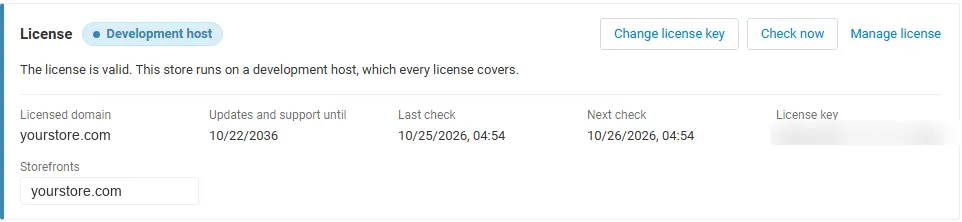
| Key | Enter it in Settings → License, or use the CS-Cart Marketplace license number in Add-ons → Manage add-ons. |
| Check now | The Check now button on the License tab repeats the check at once. |
| Server not reachable | The add-on keeps working during a grace period. |
Without a valid license: products show the standard CS-Cart stock text again, the stock status filter is hidden, listings use the standard sorting (no out-of-stock-last order), variation pickers show every variation as CS-Cart draws it, and product feeds fall back to their own availability; your statuses, rules and product settings are kept, and orders placed earlier still show the status they were placed with. The admin pages stay available.