

Vendor KYC & Verification
Add-on ID: kv_vendor_kyc_verification · Edition: Multi-Vendor only · Latest version: 1.2.1 · Compatible with: Multi-Vendor 4.17.2 – 4.22.x, PHP 7.4 – 8.3 · Changelog: view · Product page: Vendor KYC & Verification
Vendor KYC & Verification adds an ongoing “know your seller” check to your marketplace. You decide which documents vendors must provide (identity document, proof of address, business registration, tax certificate, bank statement or your own types), for which vendor plans, countries and business types. Vendors upload the documents on a Verification page in their vendor panel, you approve or reject each document in a review queue, and the add-on keeps track of expiry dates, sends reminders and shows a Verified seller badge on the storefront. Until a vendor is verified you can hold payouts, hide the vendor’s products or stop new products.
Multi-Vendor itself has no document verification: the core approves vendor accounts and (with Vendor data premoderation) profile changes, but never documents. This add-on does not replace the core vendor approval; it adds the verification layer that runs for the whole life of a vendor account.
- Requirements per vendor: document types with instructions, required or optional, limited to vendor plans, countries and a business type (individual or company). Five common types are created for you.
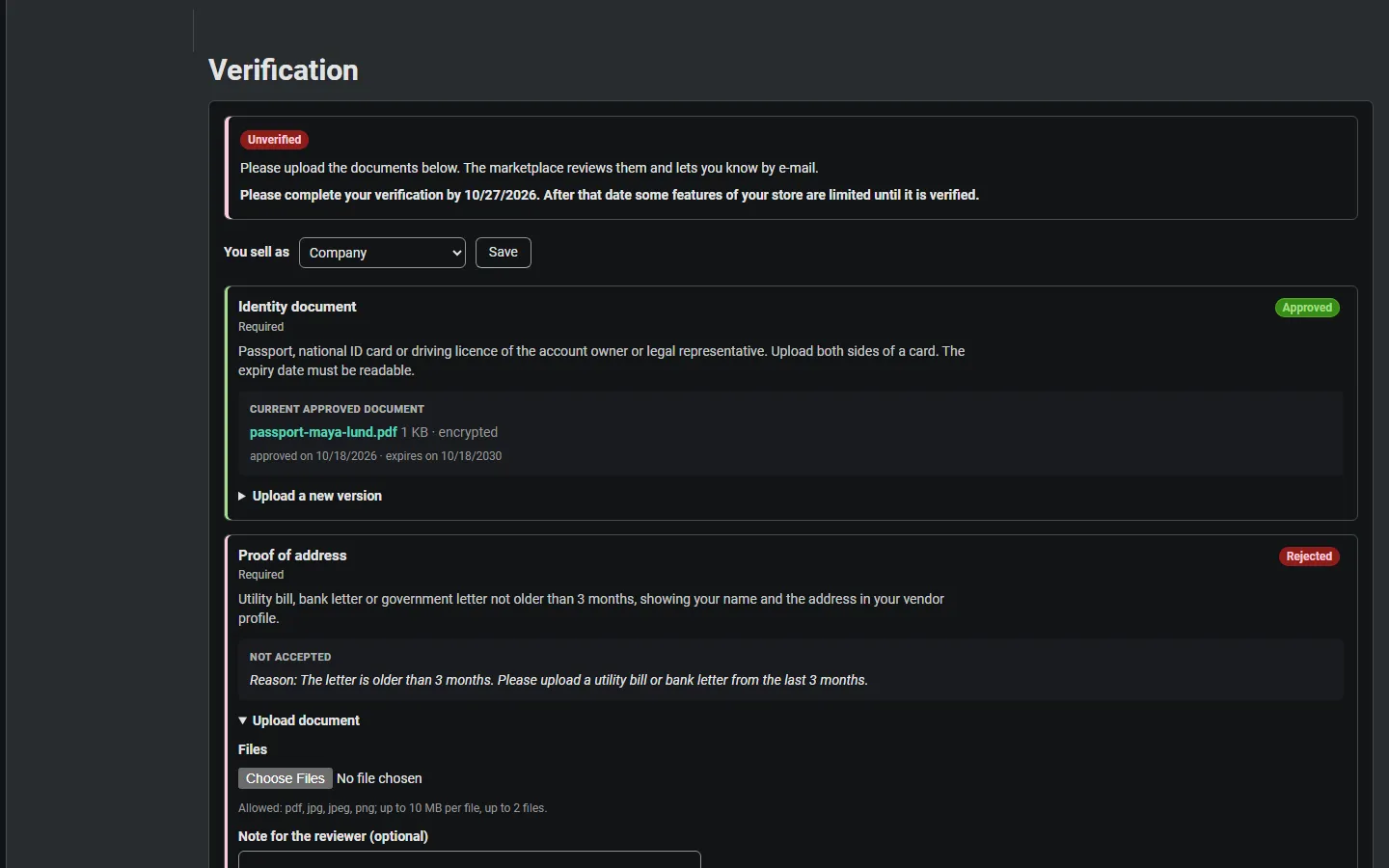
- Vendor panel page: each vendor sees the status of every document, the reason of a rejection, expiry dates and an upload form (several files per document, expiry date, note for the reviewer).
- Review queue: all documents that wait for review, oldest first. Approve with an expiry date, reject with a reason for the vendor, or ask for a new upload of an approved document later.
- Verification levels: Unverified, Pending review, Verified, Expired (and Not required). The level is recalculated on every change and by a scheduled task.
- Expiry and reminders: documents expire on the date the vendor enters, or a number of months after approval. Vendors get reminder e-mails before expiry (for example 30 and 7 days) and on the day it happens.
- Verified seller badge: on the vendor page, in vendor lists and next to the vendor name of products. It is the same for every visitor, so full page cache stays effective.
- Restrictions until verified: hold payouts and withdrawal requests (core Accounting and our Vendor Payouts Automation), hide the vendor’s products, prevent new products. A grace period, an exemption per vendor and a “lift while in review” option keep it fair.
- Secure storage: files outside the public folders, encrypted (AES-256), content checked on upload, downloadable only by the vendor itself and administrators with the privilege. Every download is logged.
- Audit log: uploads, reviews, downloads, expiry, reminders, restrictions and erasures with user, time and IP address.
- Privacy: files of replaced and rejected uploads are deleted after a retention period; “Erase all documents” per vendor for erasure requests; everything is removed when a vendor is deleted.
- DAC7 seller report (new in 1.1): based on Council Directive (EU) 2021/514. Sellers enter their tax details in the vendor panel; the add-on calculates consideration, number of activities and fees per quarter from your Accounting data, runs the threshold test, sends requests and reminders, builds the report file in the EU/OECD DPI XML format (new data, corrections, nil returns) and CSV, keeps a filing history and shows each seller their statement. See Usage: DAC7 seller report. The add-on helps you prepare the file for upload on your tax authority’s portal; it does not file for you and is not tax or legal advice.
- INFORM Consumers Act mode (new in 1.2): for marketplaces that sell to US consumers (15 U.S.C. 45f). A sales counter flags vendors with 200 or more sales and USD 5,000 or more in gross revenues in a 12-month period within the previous 24 months; flagged vendors send bank, contact and tax data on a form in the vendor panel (encrypted, shown masked), you verify it, they certify it every year, and a 10-day notice leads to a suspension you confirm. Sellers at USD 20,000 or more are shown to buyers on the product page, and every flagged seller shows how to report suspicious activity. CSV exports for audits. The add-on helps you implement the Act; it does not make you compliant by itself and is not legal advice. See Usage: INFORM Consumers Act mode.
- Works with our add-ons: Vendor Onboarding & Registration Builder (use files from the vendor application as verification documents) and Vendor Payouts Automation (payout requests of unverified vendors cannot be approved).
Documentation
Section titled “Documentation”| Page | Contents |
|---|---|
| Installation | Requirements, installing, upgrading, uninstalling |
| Configuration | Settings: general, restrictions, notifications, privacy, DAC7, INFORM, license |
| Usage | Document types, the vendor’s Verification page, reviewing, expiry, restrictions, badge, DAC7 seller report, INFORM Consumers Act mode |
| Developer notes | Data model, hooks for identity providers, file map |
| FAQ | Common questions |
Compatibility
Section titled “Compatibility”| CS-Cart Multi-Vendor | 4.17.2 – 4.22.x (Multi-Vendor only; the install is refused on CS-Cart) |
| PHP | 7.2.5 – 8.3 (whatever your CS-Cart version supports) |
| Themes | Responsive and themes based on it (Nova and others) |
| Full page cache (4.21) | Supported: the badge and hidden products are the same for every visitor, and cached pages are refreshed when a vendor’s level changes |
| Other add-ons | Vendor plans (optional, for per-plan requirements), Vendor Onboarding & Registration Builder and Vendor Payouts Automation (optional integrations) |